Crypto price alert browser extension
Hover any $TICKER or contract address and the price appears straight away, with ready-made alert levels. One click sets the alert. Your first 2 alerts need no sign-up.
Free · no wallet, no exchange keys · works on X, Twitter and Reddit out of the box
The CoinPriceAlert browser extension is a free Chrome extension that turns any cryptocurrency ticker on
a web page into a price alert in one click. Hover a $TICKER or a contract address and a
panel shows the live price, the 24-hour change, market cap and volume, with four ready-made alert levels.
Clicking one saves the alert; a desktop notification arrives when the price gets there.
It runs in Chrome, Edge, Brave and Opera, on X, Twitter and Reddit out of the box. The first 2 alerts need no account, it never asks for a wallet or an exchange API key, and because alerts are evaluated on CoinPriceAlert's servers rather than in the browser, the same alerts also reach the iOS and Android apps on the same account.
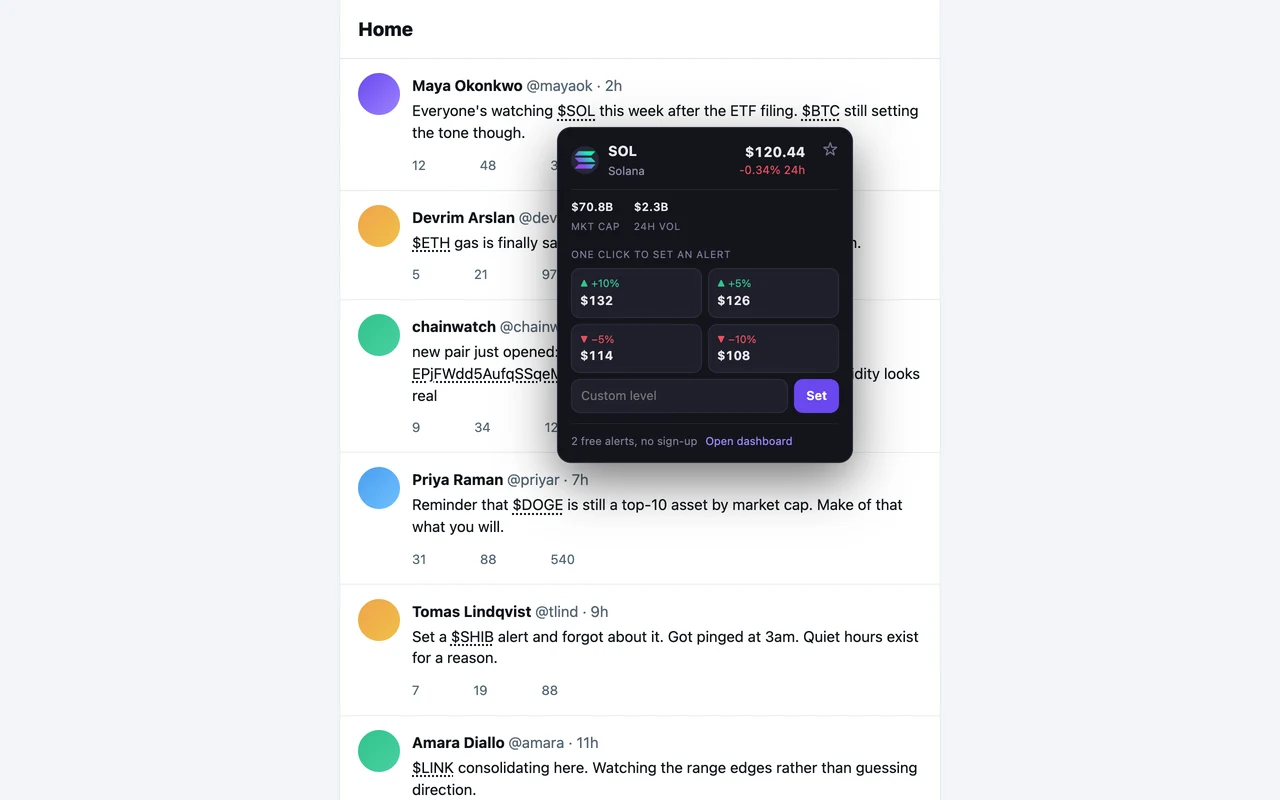
$SOL on a timeline. Every ticker on the page carries a dotted underline; the panel opens on the one you point at.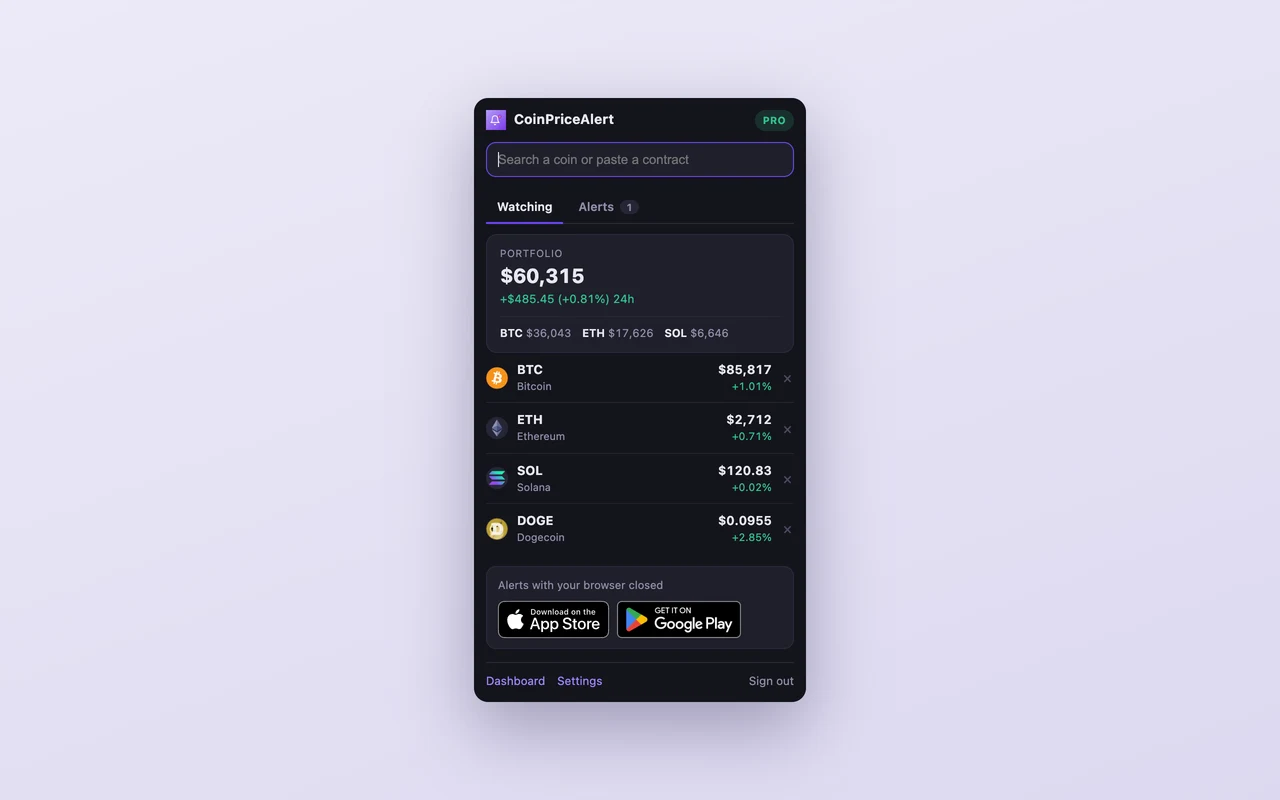
How do you set a crypto price alert from a web page?
You install the extension, hover the ticker where you read it, and click one of the four alert levels in the panel. It takes about two minutes end to end, including the install, and needs no account.
How does it compare with other crypto alert extensions?
Crypto extensions on the Chrome Web Store fall into two groups that do not overlap. Readers put a price panel over a ticker but cannot set an alert. Alerters set alerts but have no in-page layer and read exchange pairs only. Of the 5 extensions below, read off their own store listings on 5 October 2026, 0 can do both, and only 2 have shipped an update since the start of 2025.
| Extension | Users | Rating | Last updated | Hover a ticker | Sets alerts | Phone app |
|---|---|---|---|---|---|---|
| CoinPriceAlert (this one) | New — no install history yet | No ratings yet | Actively developed | Yes | Yes — price alerts, in one click from the page |
Yes — iOS and Android, same account


|
| Coinocular | 6,000 users | 4.4 out of 5 (59 ratings) | 4 October 2026 | No | Price, percentage, momentum, trailing, bulk rules across all USDT pairs, RSI scans, liquidation tracking | No |
| Stock Hover | 1,000 users | 3.7 out of 5 (3 ratings) | 26 May 2022 | Yes | None | No |
| Crypto Alert | 666 users | 4.8 out of 5 (4 ratings) | 25 March 2022 | No | Target-price alerts, maximum 6 | No |
| Quicktick | 4 users | 5.0 out of 5 (2 ratings) | 9 April 2024 | Yes | None | No |
| Crypto Price Tracker | 59 users | 3.8 out of 5 (13 ratings) | 24 August 2025 | No | Price alerts, in a ticker bar and new-tab page | No |
Where are the other extensions better?
A comparison with no losing row is an advert, and an advert is not worth citing. Each of these is a real reason to install something else instead, or as well.
Coinocular vs CoinPriceAlert
Coinocular had 6,000 users and 4.4 out of 5 (59 ratings) on the Chrome Web Store when this was read on 5 October 2026, and was last updated 4 October 2026. It has no in-page layer — you open the extension and search. It sets alerts: price, percentage, momentum, trailing, bulk rules across all USDT pairs, RSI scans, liquidation tracking. The one genuinely active competitor, and the strongest alert feature set of anything here — bulk rules across every USDT pair and a liquidation tracker are things we do not have. It is exchange-pair based, so a token that is not listed on Binance, Bybit or MEXC cannot be watched, and there is no in-page layer and no phone app. See its listing.
Stock Hover vs CoinPriceAlert
Stock Hover had 1,000 users and 3.7 out of 5 (3 ratings) on the Chrome Web Store when this was read on 5 October 2026, and was last updated 26 May 2022. It opens a panel over a ticker on the page, as we do. It cannot set an alert at all. Hovering a ticker on Twitter shows a candlestick chart, which it does better than our small panel does. It has not shipped an update since May 2022 and it cannot set an alert. See its listing.
Crypto Alert vs CoinPriceAlert
Crypto Alert had 666 users and 4.8 out of 5 (4 ratings) on the Chrome Web Store when this was read on 5 October 2026, and was last updated 25 March 2022. It has no in-page layer — you open the extension and search. It sets alerts: target-price alerts, maximum 6. The highest star rating in this table, from four ratings. Capped at six alerts and seventy coins, and last updated in March 2022. See its listing.
Quicktick vs CoinPriceAlert
Quicktick had 4 users and 5.0 out of 5 (2 ratings) on the Chrome Web Store when this was read on 5 October 2026, and was last updated 9 April 2024. It opens a panel over a ticker on the page, as we do. It cannot set an alert at all. The closest thing to our hover panel — cashtags and contract addresses both — and it reads contract addresses the same way we do. Four users, and no update since April 2024. See its listing.
Crypto Price Tracker vs CoinPriceAlert
Crypto Price Tracker had 59 users and 3.8 out of 5 (13 ratings) on the Chrome Web Store when this was read on 5 October 2026, and was last updated 24 August 2025. It has no in-page layer — you open the extension and search. It sets alerts: price alerts, in a ticker bar and new-tab page. A ticker bar and a new-tab portfolio view rather than an in-page layer. The widest claimed coin coverage of anything here. See its listing.
Sources, each read on 5 October 2026 from that extension's own Chrome Web Store listing: Coinocular · Stock Hover · Crypto Alert · Quicktick · Crypto Price Tracker. Install counts are rounded by Google and are quoted exactly as the store displays them. chrome-stats.com was tried first and refuses automated reads, so it is not a source here.
What does the extension actually do?
Six things. The first two are the ones no other extension in the table above combines.
Is the extension free, and what does Pro add?
The extension is free and stays useful without paying for anything. A Pro subscription bought in the mobile app unlocks more of it on the same account — there is nothing separate to buy here and no card form in the extension.
| Free | With Pro | |
|---|---|---|
| Hover any ticker for a live price | Yes | Yes |
| Price alerts in one click | 2 with no sign-up, 4 with an email | Unlimited |
| Pinned coins in the popup | 3 | Unlimited |
| Desktop notifications | Yes | Yes |
| Live price on the toolbar icon | — | Yes |
| Your portfolio value in the popup | — | Yes |
| Alerts when a pinned coin moves sharply | — | Yes |
Extension, web app or phone app — which should you use?
Use all three; they are the same account and the same alerts, delivered differently. The extension is the fastest way to set an alert, because it is where you were already reading. The phone app is the most reliable way to receive one, because it does not need anything to be open.
| Extension | Web app | Phone app | |
|---|---|---|---|
| Set an alert in one click from any page | Yes | — | — |
| Alerts arrive with the browser closed | — | — | Yes |
| Desktop notifications | Yes | Yes | — |
| Pinned coins at a glance in the toolbar | Yes | — | Widgets |
| Free alerts | 2 anonymous, 4 with an email | 4 | 4 |
| Percent, RSI, volume and trailing-stop alerts | — | Yes | Yes |
| Telegram and email delivery | — | Yes | Yes |
Want alerts that arrive with everything closed? The app watches the same alerts and pushes them to your phone.
Frequently asked questions
What is the CoinPriceAlert browser extension?
The CoinPriceAlert browser extension is a free Chrome extension that shows a cryptocurrency's live price when you hover any $TICKER or contract address on a web page, and lets you set a price alert on it in one click. When the price reaches your level, a desktop notification arrives. It works on X, Twitter and Reddit out of the box, and on any other site you switch it on for.
How do I set a crypto price alert from a web page?
Install the extension, hover any $TICKER or contract address on X, Twitter or Reddit, and click one of the four alert levels in the panel that opens — 5% and 10% above or below the current price, each rounded to a level a person would actually pick. You can also type your own level. The alert saves immediately, and your first 2 need no account at all.
Which browsers does the extension work in?
The extension works in Chrome, Edge, Brave, Opera and any other Chromium browser, version 116 or newer. Firefox and Safari use a different extension format and are not supported yet; for those, use the CoinPriceAlert web app or the mobile app instead.
Do I need an account to use it?
No. Your first 2 alerts work with no sign-up at all — the extension creates an anonymous account for you and saves the alert immediately. Adding an email keeps those alerts if you ever reset your browser, and raises the free limit to 4 alerts.
Is the crypto alert extension free?
Yes. The extension is free, including desktop notifications, 3 pinned coins and 4 alerts with an email address. A Pro subscription bought in the CoinPriceAlert mobile app unlocks unlimited pins and alerts, your portfolio value in the popup, a live price on the toolbar icon, and notifications when a pinned coin moves sharply. There is no card form inside the extension. The extension sets price alerts; percent, RSI, volume and trailing-stop alerts are set in the app or the web app, and they reach you the same way.
Does the extension see every page I visit?
No. It runs on X, Twitter and Reddit out of the box, and on any other site only if you explicitly switch it on there from the toolbar menu. It reads the text of those pages inside your browser to find tickers, and that text is never uploaded — the only thing sent to our servers is the ticker you hover, so it can be priced.
Does it need my wallet or an exchange API key?
No. The extension never asks for a wallet, a private key, a seed phrase or an exchange API key, and it holds no keys of any kind. It cannot trade or move funds, by design. It watches prices and tells you about them.
Will alerts arrive if my browser is closed?
No — a browser extension only runs while the browser runs. For alerts that arrive with everything closed, install the CoinPriceAlert mobile app on iOS or Android; alerts set in the extension appear there under the same account, because they are evaluated on our servers rather than in your browser.
How quickly do alerts fire?
Prices are checked on our servers every few seconds, and the extension is notified the moment one of your alerts is met. It also checks in once a minute as a backup, so a dropped connection delays an alert rather than losing it. A price older than ten minutes never decides an alert.
Can it set alerts on tokens that are not listed on a major exchange?
Yes. Hovering a contract address — an 0x address or a Solana mint — resolves the token through DexScreener, so a token too new to be listed on Binance or Coinbase can still be watched. Most alert extensions read exchange pairs only and cannot do this.
What does the extension send to CoinPriceAlert's servers?
Only the ticker or contract address you hover, so it can be priced, and the alerts and pins you choose to create. The extension reads the text of pages you have allowed it on inside your browser to find tickers; that text is never uploaded. There is no analytics script in the extension, no advertising identifier, and no record of which pages you visit. The full policy is in our privacy policy, and questions go to support.